
Introduction
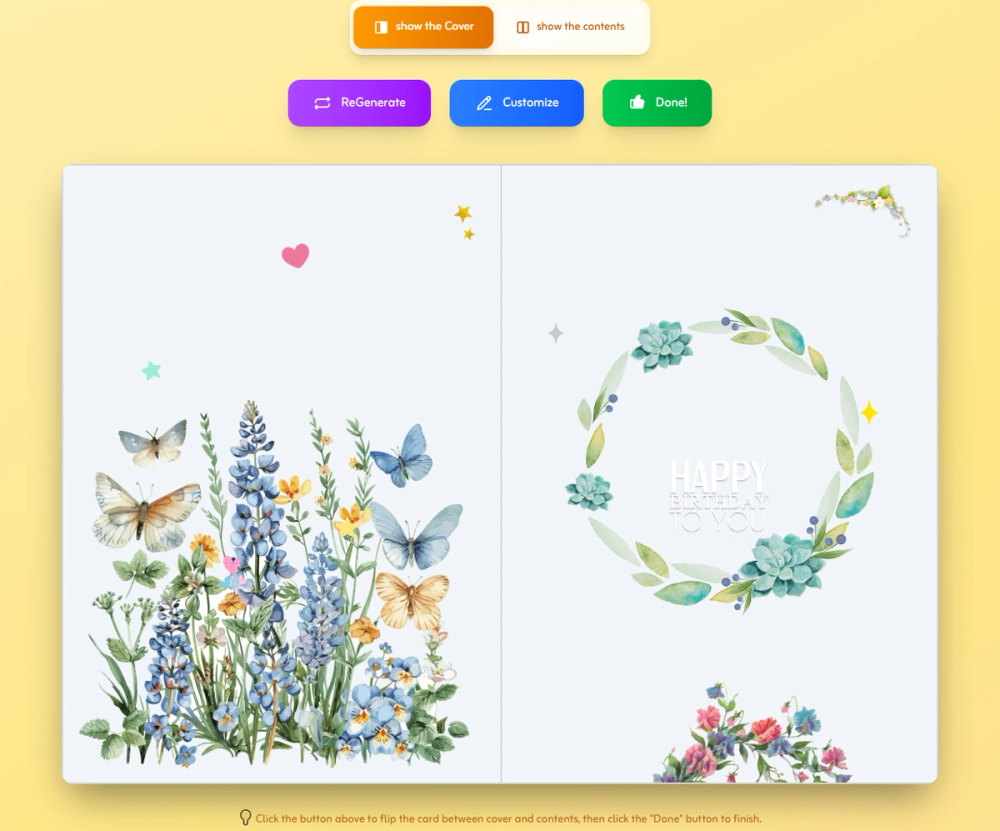
Birthday Card Maker is a free-to-start online tool for creating personalized birthday cards with generated designs, editable text, photos, decorations, and downloadable or shareable outputs. The public page presents it as a no-design-skills option for people who want a card quickly but still need room to personalize the final result. Its clearest fit is casual users, families, organizers, and small teams who need a printable or digital birthday card without opening a full design suite.
Key Features
- AI-powered or intelligent card generation that can create multiple birthday card designs from a name or a generic prompt.
- Custom editing for text, colors, fonts, stickers, decorative elements, and layout adjustments.
- Personal photo uploads for adding recipient images or memory-based designs.
- Birthday-themed graphics, decorations, and design elements for different styles and age groups.
- Free JPG download for digital sharing, with premium PDF options for A4 printing.
- Online sharing links, including a free ad-supported option and a premium ad-free sharing option.
Use Cases
Birthday Card Maker is useful when someone needs a card quickly but does not want the result to feel completely generic. A parent can create a bright kids' birthday card with cartoon-style decorations, while an adult celebration might use cleaner typography, photo memories, or more restrained colors.
The tool also fits last-minute digital greetings. Since the page describes JPG downloads and online sharing, users can make a card and send it without waiting for a print shop. For people who do want a physical card, the premium PDF and print-service signals suggest a more print-ready route, though users should confirm quality, paper options, and delivery details before relying on it for an important event.
It may also help people who are not sure what design direction to choose. The site includes ideas and guidance around themes, colors, white space, and high-resolution images, which makes it more approachable for non-designers than a blank-canvas editor.
Pricing
Birthday Card Maker is described as free to start. The visible pricing signals show free JPG downloads and free online sharing with ads, while paid options include PDF download, print service, and ad-free sharing. The public page does not show a full pricing table in the fetched evidence, so users should verify current charges, printing costs, and any limits before choosing a paid output.
User Experience and Support
The workflow is presented as three steps: enter a name and generate, customize the selected card, then download or share. Users can skip the name for a generic birthday card, which is useful when the card is for a group, a colleague, or a recipient whose name should not appear on the design.
The interface appears built around quick generation followed by direct visual editing. The page also points users toward guides and includes practical design tips, such as choosing colors that match the recipient, avoiding overcrowded layouts, and using high-resolution images for better print results. Direct support channels are not clearly visible from the fetched page, so users with print-service or payment questions should look for the latest help or contact options before ordering.
Technical Details
Birthday Card Maker is a browser-based card creation tool. The public page describes intelligent design generation, photo uploads, text editing, color changes, font changes, stickers, JPG export, premium PDF download, online sharing links, and print service.
The fetched evidence does not identify the underlying AI model, image-processing stack, browser requirements, storage policy, or file-size limits. Users who plan to upload personal photos should check the site's current terms and privacy details before using sensitive images, especially for children, family events, or private celebrations.
Pros and Cons
Pros
- Simple three-step workflow makes the tool approachable for users without design experience.
- Free JPG download and free online sharing lower the barrier for quick digital greetings.
- Customization controls cover practical needs such as photos, text, colors, fonts, decorations, and stickers.
- Theme ideas and design tips help users move beyond a plain template.
Cons
- Full pricing details for premium PDF, print service, and ad-free sharing are not clearly shown in the fetched evidence.
- Technical details such as upload limits, privacy handling, and export specifications are not fully visible.
- Free sharing includes ads, which may not suit formal, professional, or polished personal greetings.
- Users who need exact print quality should verify PDF settings, A4 formatting, and print-service terms before purchase.
FAQ
What is Birthday Card Maker used for?
Birthday Card Maker is used to create personalized birthday cards online. Users can generate card designs, customize them with photos and messages, then download or share the finished card.
Who is Birthday Card Maker most relevant for?
It is well suited for people who want a quick birthday card without using professional design software. Parents, friends, family members, office organizers, and event planners may find it useful for both digital greetings and printable cards.
Can I make a birthday card without entering a name?
Yes. The public page says users can enter the birthday person's name optionally, and can also skip the name to generate generic birthday cards that work for anyone.
What can users customize in Birthday Card Maker?
The page lists customization options including photos, text, colors, element placement, fonts, and stickers. It also describes birthday-themed graphics, decorations, and design elements.
What download and sharing options are visible?
The free options include JPG download and online sharing with ads. Paid options shown on the page include PDF download, print service, and ad-free sharing.
Is Birthday Card Maker completely free?
The tool is described as free to start, and some outputs are listed as free. However, PDF download, print service, and ad-free sharing are presented as paid options, so users should check current pricing before choosing those formats.
What should I check before printing a birthday card?
Check whether the PDF option meets your print needs, whether A4 formatting is suitable, and whether your uploaded images are high enough resolution. The site itself recommends high-resolution images, such as 300 DPI or higher, for clearer printing.
Does Birthday Card Maker explain its AI or technical setup?
The page mentions intelligent algorithms and AI-powered card generation, but it does not clearly describe the underlying model, infrastructure, file limits, or image retention details in the fetched evidence. Users uploading personal photos should review current privacy and terms information before relying on the tool.
Conclusion
Birthday Card Maker offers a practical path for creating birthday cards quickly while still allowing personal touches through names, photos, messages, and visual edits. Its free JPG and sharing options make it useful for casual digital greetings, while premium PDF and print options may suit users who want a physical card. The main things to verify are current paid-output pricing, print-service terms, and privacy details for uploaded images.