
Introduction
CostLoop is a subscription management app for small businesses, freelancers, startups, remote teams, and individuals who want a clearer view of recurring software spend. The public site presents it as a manual tracker for SaaS subscriptions, license renewals, cancellation links, invoices, contracts, owners, and recurring expenses. Its best fit appears to be users who need more reliable renewal and cost visibility without connecting financial accounts.
Key Features
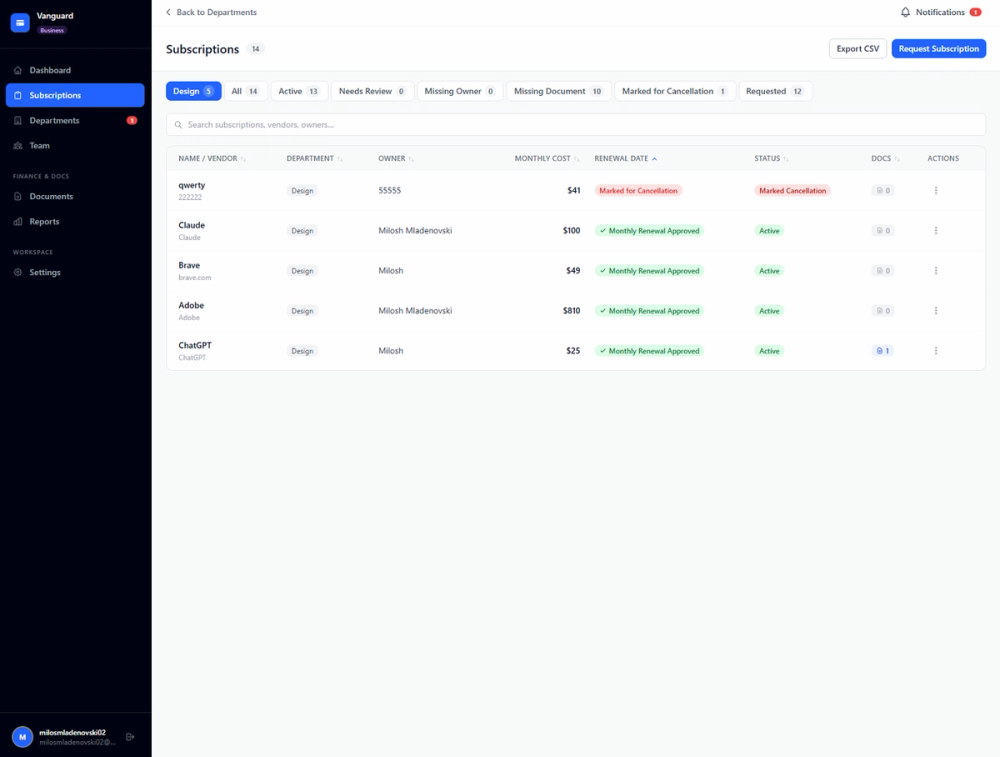
- Subscription tracking for recurring tools, including cost, billing cycle, status, category, renewal date, and owner.
- License tracking for seat counts, assigned users, expiry dates, departments, and subscription context.
- Renewal reminders through email alerts, with visible options such as 7, 14, or 30 days of lead time.
- Cost dashboards for monthly spend, annual forecast, budget comparison, category views, and basic analytics.
- Document and link storage for invoices, contracts, cancellation URLs, vendor agreements, receipts, and notes.
- Health score, savings opportunities, unused seat detection, duplicate tool detection, CSV import, CSV export, workspaces, approvals, and admin dashboards on supported plans.
Use Cases
CostLoop is built for the point where a company's subscription list becomes too messy for memory or a casual spreadsheet. The CostLoop homepage highlights common problems such as forgotten renewals, unused seats, scattered invoices, lost cancellation links, unclear ownership, and limited visibility into total spend.
Freelancers can use it to keep domains, design tools, hosting, developer services, memberships, and accounting subscriptions in one place. The practical benefit is a clearer monthly and annual view of recurring business costs, plus the ability to find cancellation and invoice details when needed.
Small teams can use CostLoop to create accountability around software ownership. The site highlights owners, departments, renewal calendars, team workspaces, subscription requests, approvals, and admin dashboards, which suggests a useful workflow for deciding who is responsible for each tool before renewal decisions become urgent.
Pricing
CostLoop lists a Free plan, Pro plan, and Business plan on its pricing page. The Free plan is $0 per month and lets users test with 1 subscription without a credit card. Pro is $9 per month for 1 user and includes unlimited subscriptions, health score and breakdown, savings opportunities, renewal calendar view, CSV import and export, advanced reminders, bulk actions, and priority support. Business is $39 per month and adds workspaces, team members, a real-time subscription request system, approvals, instant admin email notifications, a business panel view, and an admin-level dashboard. Yearly billing is shown with 2 months free, and the site says Pro can be canceled from account settings.
User Experience and Support
CostLoop's workflow is intentionally manual: users add each recurring tool with details such as name, cost, renewal date, owner, and notes. The site says there are no bank integrations, no financial-account access, and no IT ticket needed, which makes the product easier to start but also means the quality of the records depends on regular maintenance.
Support information is available through the contact page, where the team says email is the best way to reach them and that replies arrive within 1 business day. The public pages also mention billing support, refund requests, plan changes, account deletion, data export, privacy requests, blog guides, email support, and priority support by plan.
Technical Details
CostLoop is a web app with a no-bank-connection model. The site states that it is fully manual, does not connect to bank accounts or credit cards, and does not require read access to financial accounts. CSV import and CSV export are visible on supported plans, giving users a way to move subscription data in and out of the product.
Operational details visible on the public site include payments through Stripe, authentication and data storage through Supabase, and email through Resend. The site also mentions support for 10 currencies, multiple languages, privacy settings, data export, account deletion, and GDPR-related controls.
Pros and Cons
Pros
- CostLoop focuses on a clear recurring-cost problem rather than trying to become a broad finance platform.
- Manual tracking avoids bank or credit-card connections, which may fit users who prefer direct control over their data.
- Pricing and plan boundaries are visible before signup.
- Cancellation links, invoice links, owner fields, renewal reminders, and document storage address practical subscription-management issues.
- Business features such as workspaces, requests, approvals, and admin dashboards make it more relevant for teams than a simple personal tracker.
Cons
- Manual entry means CostLoop will not automatically detect subscriptions from transactions.
- Some high-value features, including health score, savings opportunities, CSV import/export, advanced reminders, and team workflows, depend on paid tiers.
- The product is not presented as a full accounting, ERP, procurement, or expense-management system.
- Teams that require deep finance integrations or automatic reconciliation should verify current capabilities before adopting it.
FAQ
What does CostLoop do?
CostLoop helps users track recurring subscriptions, licenses, renewal dates, costs, owners, cancellation links, invoices, contracts, and notes. It is built to make software spend easier to review before renewals happen.
Who is CostLoop for?
CostLoop is aimed at small businesses, freelancers, startups, remote teams, entrepreneurs, and individuals. It appears most useful for users who have several recurring tools and want a clearer system than a spreadsheet.
Does CostLoop require bank access?
No. CostLoop says it is fully manual and does not connect to bank accounts or credit cards. Users enter subscriptions themselves, so they control what is tracked but must keep the data current.
What pricing plans are available?
The public pricing page lists Free at $0 per month for testing with 1 subscription, Pro at $9 per month for 1 user, and Business at $39 per month. Yearly billing is shown with 2 months free.
What subscription details can CostLoop store?
Visible fields and features include costs, billing cycles, renewal dates, owners, departments, seat counts, assigned users, notes, cancellation links, invoice links, contracts, vendor agreement URLs, categories, statuses, and document notes.
How does CostLoop compare with a spreadsheet?
CostLoop adds structure around renewal reminders, owner records, health score, unused seat detection, duplicate tool detection, cancellation links, invoices, and subscription documents. A spreadsheet can hold similar data manually, but it does not provide the same purpose-built reminders and review signals.
What should teams check before using CostLoop?
Teams should verify which plan includes their required features, whether manual data entry fits their workflow, and whether CostLoop's focused scope is enough. If automatic spend discovery or accounting integrations are required, those needs should be checked directly.
Conclusion
CostLoop gives small businesses and freelancers a focused way to organize recurring software costs without connecting financial accounts. Its public pages are strongest around renewal visibility, ownership, cancellation links, document storage, pricing clarity, and team review features. For users replacing scattered spreadsheets, it is a practical product to evaluate against current subscription-management needs.