
Introduction
JavaScript Tools presents itself as a browser-based hub of small developer utilities for formatting, encoding, inspecting, and generating common data types. The public page emphasizes that these are focused tools for everyday development work, with an added preference for keeping input on the user's device rather than sending it to a server.
That makes it a practical fit for developers, testers, and technical generalists who need quick one-off utilities without spinning up a local project or hunting through a larger tool suite. The JavaScript Tools homepage makes the product's value pretty clear: open a tool, do the task, and move on.
Key Features
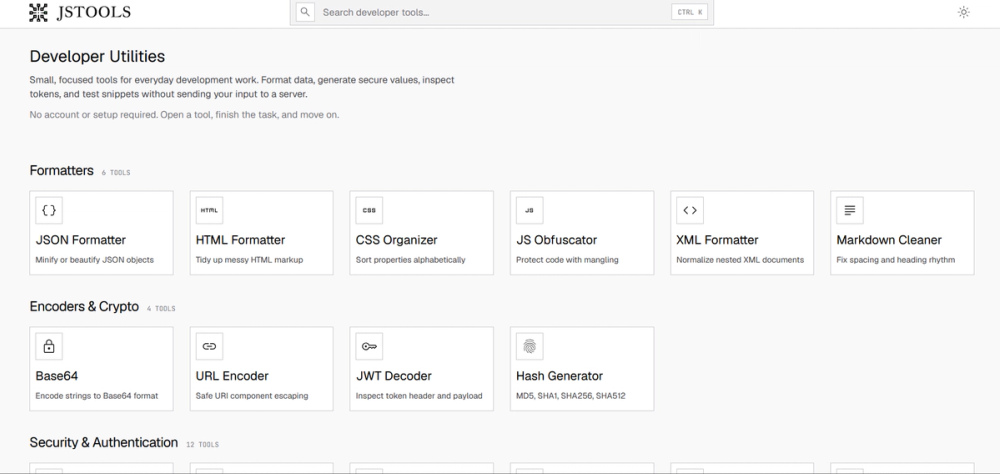
- The site groups tools into clear categories such as Formatters, Encoders & Crypto, Security & Authentication, Generators, and Developer Utilities.
- Common formatting tools are visible, including JSON Formatter, HTML Formatter, CSS Organizer, JS Obfuscator, XML Formatter, and Markdown Cleaner.
- The docs page says utilities run directly in the browser unless a page explicitly says otherwise, which helps users understand the default execution model.
- The tool set includes practical encoders and inspectors such as JWT Decoder, Hash Generator, Base64 decoders, and Basic Auth Decode.
- Security-oriented utilities are part of the hub too, with locally generated credentials, tokens, and identifiers mentioned in the documentation.
- The interface supports quick search and keyboard navigation, so users can jump to a tool by name, format, or operation instead of browsing manually.
Use Cases
JavaScript Tools looks most useful when a developer needs a fast utility for a narrow task. That includes cleaning up messy JSON, decoding a token, checking a hash, or converting Base64 into a more readable form without opening a separate app or wiring up a script.
It also appears well suited for sensitive test data and local experimentation. The documentation says input is intended to stay on the device, which is a meaningful detail for anyone dealing with private snippets, temporary credentials, or sample data that should not be sent off-site.
A practical strength here is that the tools are small and purpose-built. That is a better fit for people who want a quick answer than for teams trying to build a full workflow environment, so buyers should verify whether the available tools cover their most common tasks before depending on it as a primary utility hub.
Pricing
The public page presents JavaScript Tools as a free online developer tools hub, and the visible wording does not show a paid tier on the pages I reviewed. In practical terms, that means the main thing to verify is whether any particular tool or future feature is gated elsewhere in the product.
For most readers, the important question is not just whether it is free, but whether the free set is broad enough to cover the day-to-day utilities they actually need. The docs page is the best place to confirm what is available and how each tool is meant to behave.
User Experience and Support
The experience looks intentionally low-friction: no account, no setup, open a tool and work. The docs reinforce that the product is organized for practical use, with plain-language instructions that explain what each tool does, when to use it, and how to get a reliable result.
Support is mostly documentation-driven rather than service-driven. That is a sensible choice for a tool collection like this, but it also means users should expect self-service guidance instead of a heavy support workflow. If you need team onboarding or enterprise-style assistance, that is the part to verify before making this your standard toolkit.
Technical Details
The product is a browser-first collection of developer utilities, and the docs state that all utilities run directly in the browser unless noted otherwise. That suggests a client-side or near-client-side approach for many tasks, which is exactly what you want when the utility is supposed to be fast and disposable.
The visible category structure also hints at a broad technical scope: text formatting, token inspection, cryptography helpers, and generated assets like QR codes or placeholder content. What is not visible is a formal API, project sync model, or integration layer, so users who need automation should not assume those exist without checking the documentation.
Pros and Cons
Pros
- Broad set of small utilities covers many common dev tasks.
- Browser-based usage keeps the workflow simple and fast.
- No account requirement lowers friction.
- The docs explain the purpose of each tool in plain language.
Cons
- It is a utility hub, not a workflow platform, so it may not fit deeper team processes.
- The site does not show a formal support structure beyond documentation.
- Users needing automation or integrations will need to confirm those capabilities separately.
- As with any tool suite, some utilities may overlap with tools you already have in your editor or shell.
FAQ
What is JavaScript Tools supposed to do?
JavaScript Tools is a collection of browser-based developer utilities for formatting, encoding, inspecting, and generating common data types. The public page presents it as a fast place to handle small technical tasks without sending input to a server.
Who is this tool hub best suited for?
It looks most useful for developers, QA testers, and technical people who repeatedly need quick one-off utilities. If you often clean JSON, inspect tokens, or decode Base64, the site is aimed at that kind of day-to-day work.
Which tools are visible on the site right now?
The site shows JSON Formatter, HTML Formatter, CSS Organizer, JS Obfuscator, XML Formatter, Markdown Cleaner, JWT Decoder, Hash Generator, and several Base64 converters and decoders. That gives a good sense of the range, even before you open the docs.
How private is the workflow?
The documentation says input is intended to stay on your device and that utilities run directly in the browser unless noted otherwise. If your task involves sensitive snippets, that is the main claim to verify in the docs before using it for anything confidential.
What should I know about pricing?
The public page describes the product as a free online developer tools hub. I would still check the docs page in case a particular utility or future feature has special conditions, but the visible site does not show a paid plan.
Is there documentation if I do not know which tool to use?
Yes. The documentation page explains what each tool does, when it is useful, and how to get a reliable result. That is especially helpful if you are choosing between similar encoders, formatters, or token tools.
Does it look like a fit for team workflows or automation?
Not from the public pages reviewed. The site is clearly optimized for quick browser use, so if you need APIs, integrations, or shared workflows, that is something to confirm before treating it as a team tool.
Conclusion
JavaScript Tools is a straightforward browser utility hub for developers who want fast, focused helpers for formatting, encoding, decoding, and generating common values. Its strongest appeal is the combination of small task-specific tools, browser-based use, and plain documentation, while the main thing to verify is whether its utility set matches the exact tasks you reach for most often.