
Introduction
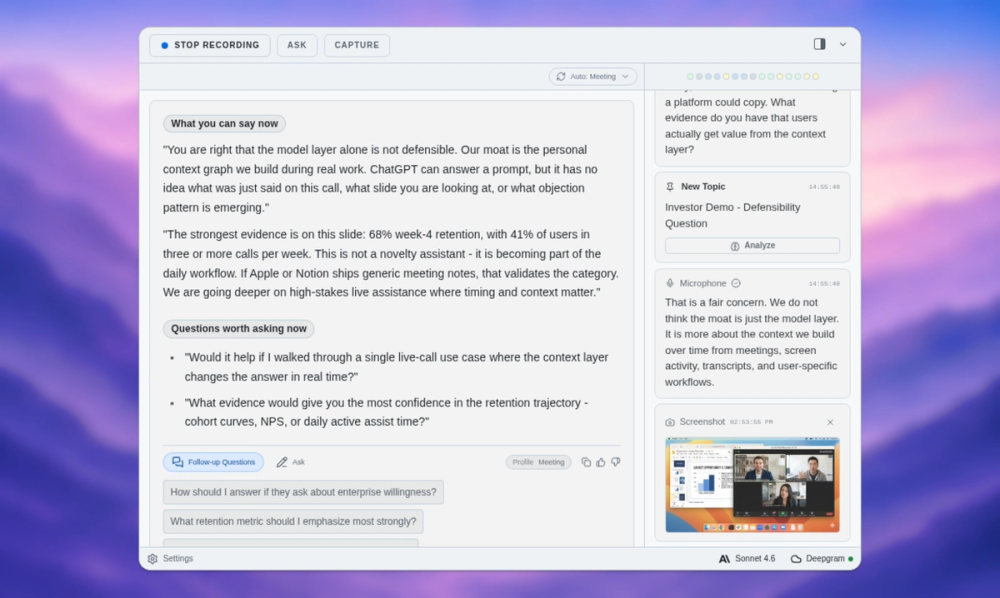
ExtraBrain is a local-first Mac desktop AI copilot for interviews, meetings, lectures, and research conversations. The public site presents it as a live thinking layer that can work with transcripts, screenshots, prompts, and selected context while giving users control over local Gemma 4 use or external AI providers.
The strongest fit appears to be people who need structured help during fast-moving live sessions: engineers in technical interviews, candidates preparing for system design rounds, meeting leads, students, founders, and research teams. The main thing to verify before using it in high-stakes settings is policy fit, because the site itself reminds users to follow interview, workplace, school, and platform rules.
Key Features
- Live transcription and context capture for interviews, meetings, lectures, customer calls, and research sessions.
- Transcript-aware prompts that can turn coding, system design, behavioral, and product prompts into structured answers, tradeoffs, questions, and follow-up points.
- Local-first setup options, including local Parakeet transcription and local Gemma 4 where installed and compatible.
- Bring-your-own-provider support for OpenAI, Anthropic, custom OpenAI-compatible endpoints, Claude Subscription, and Codex Subscription modes.
- Session memory for saved facts, prompts, screenshots, constraints, unresolved risks, summaries, and action items.
- Compatibility messaging for major meeting and interview environments, including Zoom, Google Meet, Microsoft Teams, Cisco Webex, Slack Huddles, Discord, HackerRank, CoderPad, Codility, and CodeSignal.
Use Cases
ExtraBrain is built for moments where the conversation moves faster than a person can comfortably capture notes. In an engineering interview, the tool can help summarize the coding prompt, surface edge cases, outline a baseline solution, and keep follow-up questions visible while the session is still active.
For system design and product conversations, the public page shows a workflow around turning requirements into components, tradeoffs, risks, owners, and follow-up points. That makes the product relevant not only for candidates but also for meeting leads and founders who need to leave a call with decisions and context rather than scattered notes.
The product also appears useful for lectures and research calls. Its lecture mode is framed around turning explanations into concepts, examples, and review questions, while the customer research use case highlights pain points and quotes for roadmap notes. A careful reader should separate note support from decision-making authority: ExtraBrain can organize context, but users remain responsible for accuracy, consent, and appropriate use.
Pricing
ExtraBrain has a dedicated pricing page showing free and paid options. The fetched evidence lists Free access for the core Mac desktop app, live workflow support, local Gemma 4 where installed and compatible, local Parakeet transcription, and BYO provider setup. Pro is shown at $9.99/month, with a $6.99/month Founder price, plus $79/year and $149 lifetime options; Enterprise is available by contact. The page also explains that external AI usage is separate from app access and may be billed by the providers users choose.
User Experience and Support
The setup flow is presented as three steps: download the Mac app, choose local or cloud transcription, select local Gemma 4 where supported or connect provider access, and rehearse before a real interview, meeting, or lecture. This framing is practical because many users will need to confirm microphone, transcription, model, and provider settings before relying on the tool live.
Support signals are visible on the site. The pricing evidence mentions help center, setup, privacy, and troubleshooting guides, while Enterprise includes policy, deployment, privacy, and workflow support for teams. The app is available for Mac today, with Windows and Linux planned, so non-Mac users should verify platform availability before investing time in the workflow.
Technical Details
ExtraBrain is a desktop app for Mac, with Apple Silicon and Intel Mac support mentioned in the fetched evidence. It can use local Gemma 4 on-device AI where installed and compatible, local Parakeet transcription, optional Deepgram, and several external model or subscription-based providers. This gives technical users a choice between a more local setup and explicitly sending selected content to external services.
The product is not described as a meeting bot joining the room. Instead, the site says users choose what to capture and keep session scope, prompts, and outputs under their control. Privacy depends on the selected setup, especially when content is sent to optional model or transcription providers, so teams should review provider billing, data handling, and policy requirements before using it in sensitive contexts.
Pros and Cons
Pros
- Clear positioning for live interviews, meetings, lectures, and research rather than generic note-taking.
- Local-first options and BYO provider support give users more control over model and transcription choices.
- Pricing is visible, with free, monthly, yearly, lifetime, and enterprise paths described.
- The site includes practical policy reminders for interviews, workplaces, schools, and platforms.
- Use cases are concrete, including coding interviews, system design, meeting follow-up, customer research, and lecture review.
Cons
- Currently available for Mac, while Windows and Linux are only described as planned.
- Local Gemma 4 support depends on compatible installation and hardware, so not every user will get the same local setup.
- External provider usage may create additional costs outside the app subscription.
- Users must be careful about consent and rules when using live assistance in interviews or workplace calls.
- The product's value depends heavily on setup quality, transcription accuracy, and the chosen model provider.
FAQ
What is ExtraBrain used for?
ExtraBrain is used as a desktop AI copilot during live interviews, meetings, lectures, and research conversations. It can capture context from transcripts, prompts, screenshots, and selected information, then help structure answers, notes, summaries, risks, and follow-up points.
Who is ExtraBrain best suited for?
The public site names engineers, candidates, students, founders, meeting leads, and research teams. It appears especially relevant for people who need to think clearly while a live conversation is still moving.
Does ExtraBrain work locally?
ExtraBrain is described as local-first. It can keep transcripts, prompts, screenshots, and notes on the user's Mac in a fully local setup when using local Gemma 4 and local Parakeet transcription, but privacy also depends on whether the user sends selected content to optional external providers.
Which AI providers can ExtraBrain connect to?
The site mentions local Gemma 4 where installed and compatible, OpenAI, Anthropic, custom OpenAI-compatible endpoints, Claude Subscription, and Codex Subscription modes. Users should confirm the exact setup, billing, and data behavior for whichever provider they choose.
Is ExtraBrain available for Windows or Linux?
The fetched page says ExtraBrain is available for Mac today, with Windows and Linux planned. Users outside the Mac ecosystem should check the current download page before assuming support for their operating system.
How much does ExtraBrain cost?
The pricing page lists Free access, Pro at $9.99/month, a $6.99/month Founder price, $79/year, $149 lifetime, and Enterprise by contact. It also states that external AI usage is billed by the providers users choose, so total cost may include both app pricing and provider fees.
Can ExtraBrain be used in technical interviews?
The site explicitly describes use cases for coding interviews, LeetCode-style prompts, system design rounds, behavioral interviews, product interviews, data and ML interviews, and consulting cases. Users should still follow the rules of the employer, school, platform, or interview process.
What should teams verify before using ExtraBrain in meetings?
Teams should verify privacy expectations, provider configuration, transcription settings, platform rules, and whether local or external processing is appropriate for the content being discussed. Enterprise support is mentioned for policy, deployment, privacy, and workflow needs.
Conclusion
ExtraBrain stands out as a live-session copilot with a strong emphasis on local-first control, provider choice, and structured support for interviews and meetings. Its public site gives unusually clear guidance on pricing, use cases, compatible workflows, and policy responsibility.
For Mac users who frequently handle technical interviews, customer calls, lectures, or research conversations, it may be worth evaluating as a private thinking and note-support layer. The best next step is to confirm platform fit, provider costs, and usage rules before bringing it into a real high-stakes session.